Computed and Summary Fields
Description
Learn how to define computed values using JavaScript and how to create summary fields for Repeat groups in JSON Forms.
Computed and Summary Fields
It is common when defining a form to define computed values. For example, in an invoice form you will likely have a price and quantity field for each invoice line item and you will typically want to compute the extended total (price * quantity) for each line in the invoice line items section.
Computed values are defined using Javascript code. To define a computed value, check the Computed property.
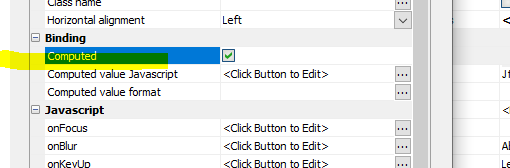
Then click the smart field for the Computed value Javascript property and define the Javascript. For example:
return Number(data.price ) * Number(data.quantity)
You can also format the computed value by defining a format in the Computed value format property.
When you are defining a computed value for fields in a Repeat group (for example, in an invoice form where the line items are in a Repeat group), the expression you define will refer to values in the current Repeat instance.
Computing Summary Values
If your JSON Form has any Repeat groups you can compute a summary value for any of the fields in the Repeat group. Summary fields are only meaningful if the JSON Form has a Repeat group.
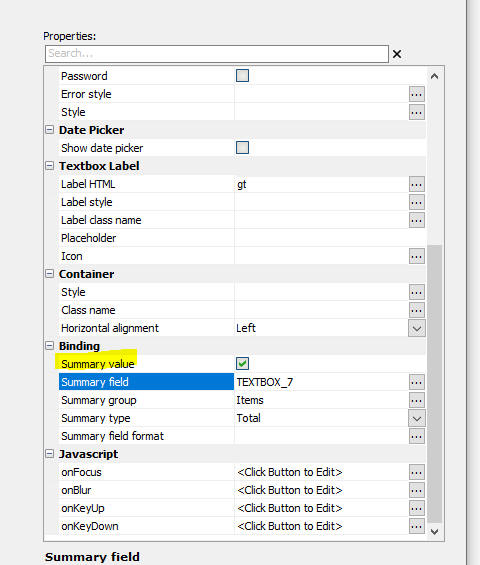
Check the Summary field property and specify the following settings:
- Summary field - This is the field you want to summarize. For example, say your JSON Form has a Repeat group (called, say, items) with these fields: price, qty and extendedTotal. In this example, the Summary field is extendedTotal and the Summary group is items.
- Summary group - This is the Repeat group that contains the Summary field.
- Summary type - This is the type of summary computation you want to perform (for example, count, total, average).
Configuring Read-only Fields
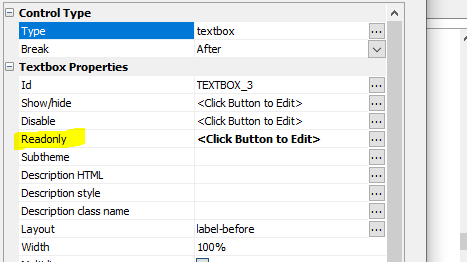
It is typical to set computed and summary fields to be readonly by setting the JavaScript in their Readonly property to this:
return true;
Videos
Defining a summary calculation for a field in a Repeat group
In this video we show how to add calculated and summary fields to a JSON Form. (Summary fields are only meaningful if the JSON Form contains a Repeat group).
See Also